How to Make a Good Night Card Online for a Long-Distance Relationship: Two Time Zones, Your Letter, a Moon That Breathes
A good night across a time zone has two problems: it arrives at the wrong hour, and it arrives as text. This guide shows how to make an interactive good night card online in about two minutes, with the live time in both cities, a paper plane they fly to your letter, and a moon that breathes with them before they sleep, and how to send it so it is waiting at their bedtime.
The short answer
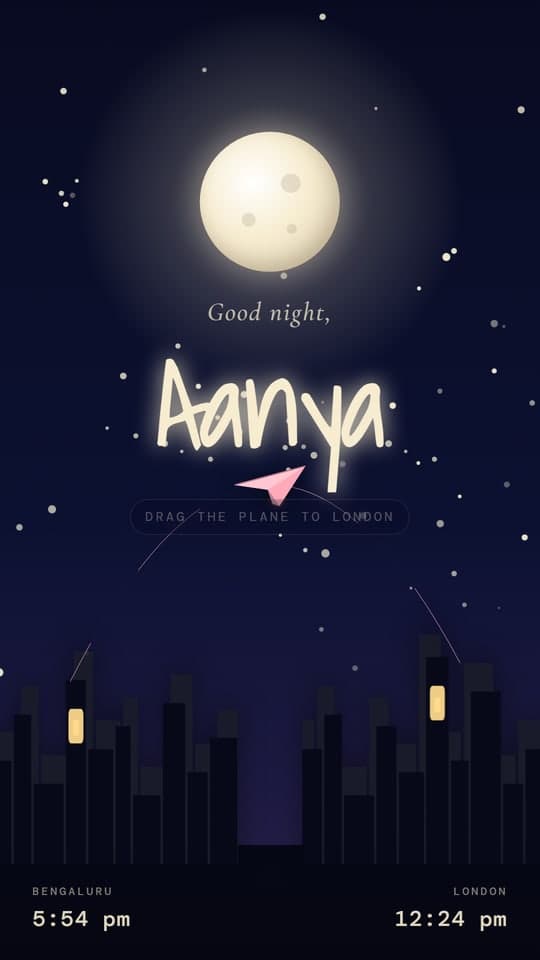
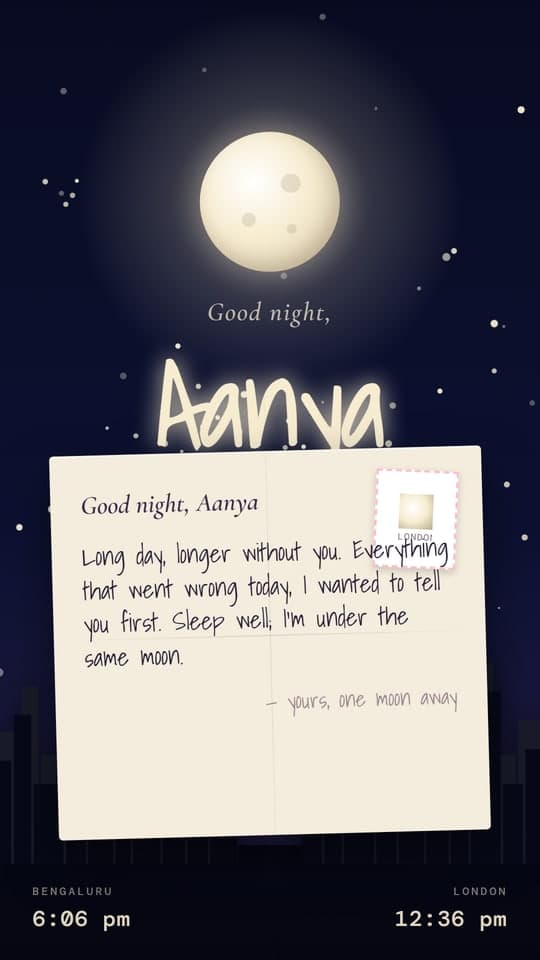
To make a good night card online for a long-distance relationship, open the Same Moon card on MomentoCard, set where you are and where they are with the two time zones, type their name, the first line, your letter (200 characters), your sign-off, the last line and the date you next meet, add their square photo as the stamp and your WhatsApp number, preview it on your phone and share the link at their bedtime. The card plays for about 48 seconds: a touch on the moon writes their name in stars, a drag flies the paper plane from your city to theirs and it unfolds into the letter with the stamp and 'N sleeps until' the next time, and 'ready to sleep?' dims the sky so the moon breathes with them three times before your last line and a button that opens WhatsApp to you with their good night typed. The clocks under the two cities are live. Free to make and preview, no account to start, opens in any phone browser.
Two live clocks
Pick your time zone and theirs; the card shows the time under both cities whenever it is opened. No maths, no 'is it late there?'.
Their name in stars
A touch on the moon brightens it and writes 'Good night, <name>' across the sky in a glowing line of stars.
A plane they fly
They drag the paper plane along the arc from your window to theirs. Let go early and it glides back; if they never drag, it flies itself.
A letter with a stamp
200 characters in handwriting, their photo as the stamp with their city under it, your sign-off, and the sleeps until you next meet.
A wind-down, not a sign-off
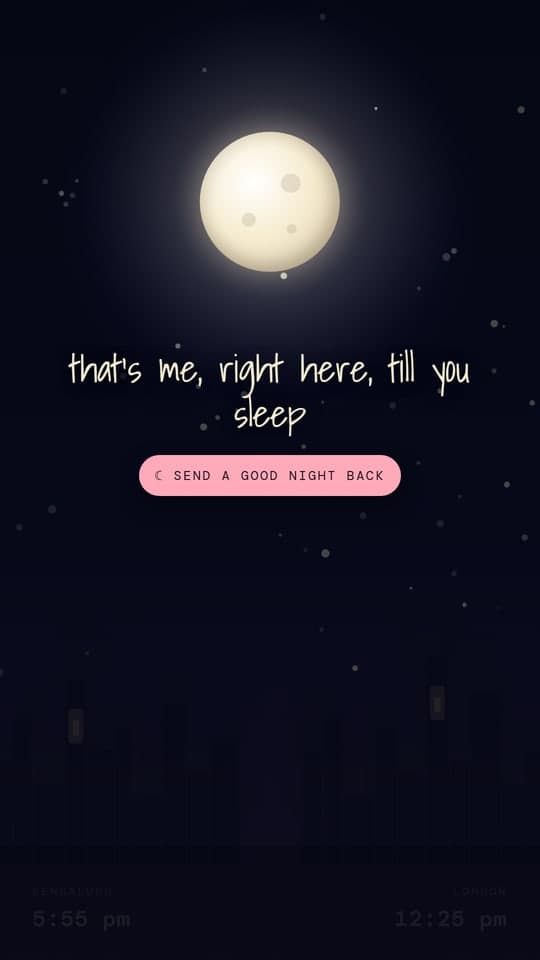
'ready to sleep?' dims everything to the moon, which breathes with them three times before your last line. The card ends calmer than it began.
A reply in one tap
Your WhatsApp number turns the end into a button that opens WhatsApp to you with their good night typed. No number, no button.
Good night across time zones: MomentoCard vs the usual options
| Feature | MomentoCard | A text / a voice note / a video call / a forwarded image |
|---|---|---|
| Their time | Shown live under their city | You do the maths; the video call needs both awake |
| If they're asleep | Waiting at their morning, clocks still right | Text: buried under the morning's messages; call: missed |
| Something to do | Touch the moon, fly the plane, breathe | Read, or listen once |
| Your photo of them | As the stamp on the letter | Text: attached; forward: no |
| The count | '48 sleeps until Mumbai', counts down daily | You update it by hand |
| A reply | One button, WhatsApp opens with it typed | They type one when they wake, or don't |
| Time to make | About two minutes | Text: seconds; call: needs both free |
| Cost | Free to make and preview; a one-time unlock to share | Free |
Steps to make the good night card
- 1
Open the card
Same Moon on MomentoCard. The sky, the moon and the two cities are already there; no account is needed to start.
- 2
Set the two cities and time zones
'Where I am' and 'where they are', with the time zones from the list (India, UAE, UK, Europe, US East and West, Singapore, Australia and more). The clocks under the cities go live.
- 3
Write the first line, the letter and the last line
The first line shows before the moon is touched (80 characters). The letter is 200 characters, in handwriting, with your sign-off. The last line appears after the breathing (60 characters): 'that's me, right here, till you sleep'.
- 4
Add the stamp, the count and your number
One square photo of them for the stamp. The date and place you next meet for 'N sleeps until'. Your WhatsApp number and the reply you want them to send.
- 5
Preview and send at their bedtime
Watch it once on your phone, touch the moon, drag the plane. Share the link on WhatsApp at their bedtime with one line of your own above it, or the night you got home late.
One complete card, ready to copy
First line: got home late. the city's asleep. you're one moon away.
The letter: Long day, longer without you. Everything that went wrong today, I wanted to tell you first. Sleep well; I'm under the same moon. — yours, one moon away
Last line: that's me, right here, till you sleep
70+ more lines for her, for him and for the time zone between you, in the good night messages post
Frequently asked questions
How do the two time zones work on the card?
You pick yours and theirs from a list and name the cities. The card reads the real time in both zones whenever it is opened and shows them under the two skylines, so it is right at their 7 pm and still right at their 7 am. The letter is stamped with their city.
What if they don't drag the plane?
It flies itself a few seconds after it appears, and the letter still unfolds. The same goes for the moon and the breathing: every beat waits for the gesture and then does it on its own, so a sleepy person gets the whole card and a video export never waits.
Can I add their photo?
Yes, one square photo, as the postage stamp on the letter with their city printed under it. Without a photo the stamp shows a small moon.
What is the breathing?
After 'ready to sleep?', the sky dims to the moon and a ring around it grows and shrinks three times with 'breathe in' and 'breathe out'. Then your last line. It is a short wind-down, so the card ends with them calmer than it found them.
How does the reply button work?
Add your WhatsApp number. After the last line a button appears; one tap opens WhatsApp on their phone to your number with the reply already typed. They hit send. Leave the number empty and no button is shown.
When should I send a good night card to someone in another time zone?
At their bedtime, not yours. If they are already asleep, send it anyway; it is the first thing they open at their morning. The night you got home late, send it that night. The night before you fly to see them, set the date so the letter says '1 sleep'.
Is it free?
Making and previewing are free and need no account. Same Moon is a premium card, so sharing the link or downloading the video needs a one-time unlock or a plan; the price is on the card page.